
Round 6 • Flags and branching
View PDF Download PDF (333 KB)
// Introduction
In this episode we will tackle flags and branching. There are quite a few traps to fall into for beginners, let’s start by jumping into one of them right now!
// A first try at “smaller than”
let’s say we want to fill the first 256 chars of the screen using this simple rule.
if position < 200 put a ‘-’ else put a ‘+’
Having a quick look at the assembly there is ‘bmi’ which stands for ‘Branch on MInus’ that sounds really good, doesn’t it? let’s give it a try.
BasicUpstart2(main)
main:
    // Using x to hold the
    // current position we want to
    // put the char into
    ldx #0
loop:
    cpx #200
    bmi smaller // Branch on MInus
bigger:
    lda #'+'
    jmp next
smaller:
    lda #'-'
next:
    // put the char at position x
    // on the screen
    sta $400,x
    inx
    bne loop

forever:
    jmp forever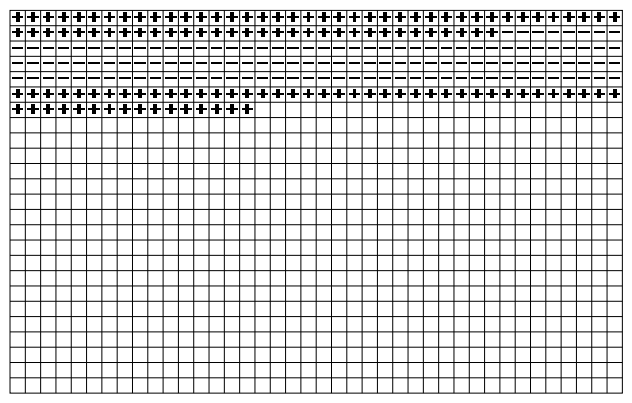
Despite the wrong output, the logical flow is correct. To understand what’s wrong, we should take a detour and start talking about flags and about how comparison (cmp, cpx, cpy) works. We will then revisit this code and see what to change to make it work.
// Comparison
There are 3 comparison instructions, cmp, cpx and cpy. cmp is meant to test the Accumulator (A) while cpx and cpy are for doing comparisons on the x and y registers. They are all working in the same way. Performing a comparison is actually about doing a subtraction where the result is thrown away after setting a few flags.
For instance
ldx some_var
cpx #200
bne not_equals

equals:
  ...
  jmp done
not_equals:
  ...
done:
  ...
In the code above, cpx #200 will start by performing “some_var - 200” and set some flags depending on the result of the subtraction. Then bne will check the Z flag and branch only when the result of the subtraction is not 0, i.e. when some_var is not equal to 200. Let’s check what these flags are in more detail.
// This is all about flags
All branching logic is based upon flags. let’s focus on three of them for now, ‘Z’, ‘N’ and ‘C’.
Z Flag (Zero)
As we just saw in the previous example, the Z flag is about Zero.
lda #0 // set the Z flag to 1
lda #1 // (or any value that is not 0) will clear the Z flag (to 0)
Here are the instructions that alter (set or clear) the Z flag.
- pla, plp
- rti
- bit
- lda, ldx, ldy
- tax, tay, tsx, txa, tya
- adc, sbc, and, ora, eor
- cmp, cpx, cpy
- inc, dec, inx, dex, iny, dey
- asl, lsr, rol, ror
About branching
- bne branches when flag Z is clear (is 0).
- beq branches when flag Z is set (is 1).
N Flag (Negative)
Flag N is related to bit7 of a computation, N stands for Negative, because bit7 is the sign bit for when we want to represent negative numbers. That said, flag N is not only for negative numbers.
Instructions that alter the N flag are the same ones that alter the Z flag.
lda #$ff        // will set the N flag to 1
lda #%11111111  // same using a binary value

lda #127        // will clear N flag.
lda #%01111111  // same using a binary value
About branching
- bpl branches when flag N is clear (is 0).
- bmi branches when flag N is set (is 1).
We already saw this code to wait for the raster to reach the top of the screen, using bpl and bmi despite having nothing to do with negative numbers. In this case bmi and bpl are branching based on the bit7 of $d011 which tells us whether the raster position is bigger/smaller than 255.
bit $d011
bpl *-3
bit $d011
bmi *-3
‘C’ Flag (Carry)
The Carry Flag (C) captures the bit that “falls out” of the top end (bit 7) or bottom end (bit 0) of an operation.
It acts as a temporary 1-bit extension to a register, preserving a bit that would otherwise be lost.
Here are the instructions that alter (set or clear) the C flag. That’s a bit different from the Z and N flags.
Unlike Z and N flags, we can set and clear carry directly with
clc / sec
These operations alter the C flag:
- adc, sbc
- asl, lsr, rol, ror
- plp, rti
- cmp, cpx, cpy
These operations DO NOT affect the C flag.
- lda, ldx, ldy, tax, tay, txa, tya, tsx
- inc, dec, inx, dex, iny, dey
- and, ora, eor, bit
About branching
- bcc branches when flag C is clear (is 0).
- bcs branches when flag C is set (is 1).
With that in mind, let’s revisit our first example.
// A second try at filling the screen with ‘-’ and ‘+’
We want to fill the first 256 chars of the screen, still with the same rule if position < 200 put a ‘-’ else put a ‘+’
But why did we get this the first time?
BasicUpstart2(main)
main:
    // Using x to hold the
    // current position we want to
    // put the char into
    ldx #0
loop:
    cpx #200
    bmi smaller // Branch on MInus
bigger:
    lda #'+'
    jmp next
smaller:
    lda #'-'
next:
    // put the char at position x
    // on the screen
    sta $400,x
    inx
    bne loop

forever:
    jmp forever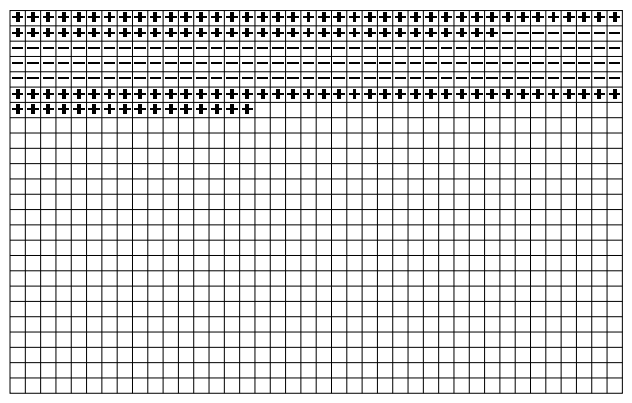
let’s check a few wrong positions, starting with the first one. the char in the top/left corner (when x = 0) is a ‘+’ which is wrong.
ldx #0
loop:
    cpx #200
    bmi smaller
for x=0, cpx 200 will perform a subtraction like this
0 - 200 = −200
−200 cannot be fully represented using only 8 bits, but ends up looking something like this in binary:
| −200 | 0 | 0 | 1 | 1 | 1 | 0 | 0 | 0 |
bit7 (the first cell on the left) is 0 so “bmi smaller” will not trigger, that’s why we end up with a ‘+’ and not a ‘-’ in the top/left corner.
TLDR - bmi is not what you should use to perform “less than” comparison.
The solution is to use bcc instead of bmi, like this
BasicUpstart2(main)
main:
    ldx #0
loop:
    cpx #200
    bcc smaller // bcc instead of bmi
bigger:
    lda #'+'
    jmp next
smaller:
    lda #'-'
next:
    sta $400,x
    inx
    bne loop

forever:
    jmp forever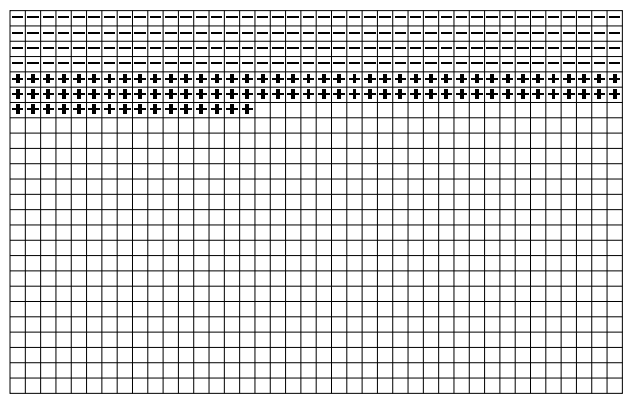
// Why bcc actually works for a “smaller than” check
Remember what cpx #200 really does: it subtracts. It works out X - 200, sets the flags, and throws the result away. So “is X smaller than 200?” is really the question “what happens when we subtract 200 from X?”
Two cases:
- If
Xis200or more, thenX - 200lands in the normal0–255range — no borrow is needed. The 6502 signals “no borrow” by setting the Carry:C = 1. - If
Xis smaller than200, the subtraction has to reach below0, so it borrows and the result wraps around (exactly like the0 - 200 → $38we just saw). The 6502 signals “a borrow happened” by clearing the Carry:C = 0.
So, right after a compare, the Carry answers one clean question: did we have to borrow? — which is the same as asking was X smaller?
C = 0→X < 200C = 1→X >= 200
And that is exactly why bcc works: it branches when the Carry is clear, i.e. precisely when X < 200.
Look back at our very first cell, x = 0. The subtraction 0 - 200 wrapped around to $38, and we saw its bit 7 was 0 — that’s why bmi did the wrong thing. But a borrow clearly did happen (0 really is less than 200), so the Carry was cleared, and bcc branches correctly. That’s the whole difference: bit 7 is just one bit of the leftover result and can mislead you about size, while the Carry tracks the borrow honestly for every value from 0 to 255.
Side note:
bccis a strictly smaller-than test. Atx = 200,200 - 200 = 0, no borrow, soC = 1andbccdoes not branch — position200gets a'+', which is what “if position < 200” asks for.- Its opposite is
bcs(branch on carry set), meaning>=. Together,cmp/cpx/cpyfollowed bybccorbcsgive you the unsigned “smaller” and “greater-or-equal” pair — and unsigned is exactly what screen positions, counters and offsets are.
// Situations that pop up all the time
Doing a loop over all 256 values of a byte
for instance to clean the screen.
lda #' '
ldx #0
loop:

  sta $0400,x
  sta $0500,x
  sta $0600,x
  sta $06e8,x   // Can you guess why
                // $06e8 and not $0700 here

  inx           // Do you think 'dex'
                // would work the same in this case?
bne loop- Why $06e8 instead of $0700? Screen RAM is 1000 bytes (0400–07E7). Since 0400,0500, and $0600 cover 768 bytes, you only need 232 more bytes. But very often, we keep looping over 256 values for that last part too, and then start from $06e8 instead of $0700 ($06E8 + 255 = $07E7). This is to avoid an overflow (writing after $07e7 could have some nasty side effects, as we will see in part II when using sprites.)
- Would dex work the same? Yes. Starting at 0, dex wraps to 255, then counts 254, 253, … reaching 0 on the 256th iteration (flag Z=1, that is set by inx/dex, ends the loop).
Doing a loop from 0 up to NB-1 (NB excluded)
.const NB = 8
ldx #0
loop:
  // doing something with x here //

  inx
  cpx #NB
  bne loop
Looping NB times
Use this when you need to repeat an action exactly NB times and don’t need x to end at 0.
.const NB = 8
ldx #NB
loop:

  // doing something with x here //

  dex
  // comparison (cpx) not needed anymore
  bne loop
x steps through values 8, 7, 6, 5, 4, 3, 2, 1. The loop exits before executing with x = 0.
Looping NB times - from NB-1 down to 0 (inclusive), for NB <= 129
Use this when you need NB iterations and need register x to take values from NB - 1 down to 0 inclusive.
.const NB= 8
ldx #NB-1 // start from NB-1 (i.e 7)
loop:

  // doing something with x here //

  dex        // Sets Negative flag (flag N=1) when `x` rolls over from 0 to $FF
  bpl loop   // Branch if Positive (flag N=0), loops while `x` >= 0
limitation: at first glance this looks like it should only work for NB <= 128 — with ldx #NB-1 the start value is at most ldx #127, which is positive, so bpl keeps looping all the way down to 0. But if you actually try it, you’ll find it works up to NB = 129. That one extra value is worth understanding.
The key is that bpl tests the N flag after the dex, never at the top of the loop. So the starting value itself is never checked — only the values each dex produces.
- For
NB = 129, the start value isNB-1 = 128 = $80. The body runs once withx = 128(never tested), thendexgives127 = $7F, which is positive, so the loop carries on normally down to0. It works — exactly 129 iterations. - For
NB = 130, the start value isNB-1 = 129 = $81. The body runs once withx = 129, thendexgives128 = $80— still “negative” (bit 7 set) — sobplbails out after a single iteration. Broken.
So why does 128 slip through but 129 doesn’t? Among all the “negative” values $80–$FF, only $80 (128) decrements straight into positive territory ($7F). Every other one decrements into another bit7- set value. $80 is the single bit7-set start value that survives its first dex — and that’s why the real limit is NB <= 129, not 128.
Side note: NB or N? In this part, I’m using NB as a constant, for the number of iterations.
N mentioned in comments, is a CPU flag that is set or cleared in this case by ‘dex’.
Looping NB times - from NB-1 down to 0 (inclusive), for when NB could be > 129
.const NB = 253
ldx #NB-1
loop:
  // doing something with x here //

  dex
  cpx #$FF     // Did X wrap around past 0?
  bne loop
Looping NB times - from 0 up to NB-1 (works for any NB)
Unlike the bpl trick above, this counts up and exits with cpx, so it isn’t limited by the sign bit — it works for any NB (here 253).
.const NB = 253
ldx #0
loop:
    // doing something with x here //

  inx
  cpx #NB
  bne loop
// Recap of Flag Usage by Mnemonic
| Mnemonic | Type | Z | N | C | I | V | D | Notes / Key Effects |
|---|---|---|---|---|---|---|---|---|
lda / ldx / ldy | Load | W | W | - | - | - | - | Sets N if bit 7 = 1; sets Z if value = 0. |
sta / stx / sty | Store | - | - | - | - | - | - | Does not alter or test any flags. |
tax / tay / tsx | Transfer | W | W | - | - | - | - | Sets N if bit 7 = 1; sets Z if value = 0. |
txa / tya | Transfer | W | W | - | - | - | - | Sets N if bit 7 = 1; sets Z if value = 0. |
txs | Transfer | - | - | - | - | - | - | Exception: Alters no flags! |
inc / dec | Mem Math | W | W | - | - | - | - | Sets Z if result is $00; sets N if bit 7 = 1. |
inx / dex / iny / dey | Reg Math | W | W | - | - | - | - | Sets Z if result is $00; sets N if bit 7 = 1. |
adc | Add | W | W | R/W | - | W | R | A = A + M + C. Usually requires clc before 8/16-bit math. |
sbc | Subtract | W | W | R/W | - | W | R | A = A - M - (1-C). Usually requires sec before 8/16-bit math. |
and / ora / eor | Logic | W | W | - | - | - | - | Sets N if bit 7 = 1; sets Z if result is $00. |
cmp / cpx / cpy | Compare | W | W | W | - | - | - | Sets C if A >= M; Z if A == M; N = bit 7 of (A-M). |
bit | Bit Test | W | W | - | - | W | - | N = M bit 7, V = M bit 6; Z set if (A AND M == 0). |
asl / lsr | Shift | W | W | W | - | - | - | asl shifts bit 7 -> C; lsr shifts bit 0 -> C. |
rol / ror | Rotate | W | W | R/W | - | - | - | Shifts through C. Old C enters opposite side. |
clc / sec | Flag Op | - | - | W | - | - | - | clc clears C (C = 0); sec sets C (C = 1). |
cli / sei | Flag Op | - | - | - | W | - | - | cli enables IRQs (I = 0); sei disables IRQs (I = 1). |
cld / sed | Flag Op | - | - | - | - | - | W | cld clears D (D = 0); sed sets D (D = 1). |
clv | Flag Op | - | - | - | - | W | - | Clears Overflow flag (V = 0). |
brk | Software IRQ | - | - | - | W | - | - | Forces interrupt sequence, sets I=1. |
php | Push Flags | R | R | R | R | R | R | Pushes status register to stack (CPU flags unchanged). |
plp | Pull Flags | W | W | W | W | W | W | Overwrites Z, N, C, I, V, D from stack. |
bne / beq | Branch | R | - | - | - | - | - | bne branches if Z=0; beq if Z=1. |
bcc / bcs | Branch | - | - | R | - | - | - | bcc branches if C=0; bcs if C=1. |
bpl / bmi | Branch | - | R | - | - | - | - | bpl branches if N=0; bmi if N=1. |
bvc / bvs | Branch | - | - | - | - | R | - | bvc branches if V=0; bvs if V=1. |
jmp / jsr / rts | Control | - | - | - | - | - | - | No status flags read or modified. |
R= ReadW= Modify-= not affectedR/W= read and modified- ‘Z’, ‘N’, ‘C’, ‘I’, ‘V’, ‘D’ are the different CPU flags
- ‘A’ is the Accumulator
- ‘M’ is Memory Operand (data value located at a specific address in RAM (or I/O registers) that an instruction operates on, rather than data stored inside one of the CPU’s internal registers (like A, X, or Y).)
// Recap of the mnemonics we used so far
| Mnemonic | Description |
|---|---|
lda | Load Accumulator — Loads a value into register A. |
ldx | Load X Register — Loads a value into register X. |
ldy | Load Y Register — Loads a value into register Y. |
sta | Store Accumulator — Writes the value from register A into memory. |
jmp | Jump — Sets the Program Counter (PC) to jump directly to a target address. |
jsr | Jump to Subroutine — Pushes the return address onto the stack and jumps to a subroutine. |
rts | Return from Subroutine — Pulls the return address from the stack and resumes execution after the jsr. |
clc | Clear Carry Flag — Clears the Carry flag (C = 0), required before 8-bit or 16-bit addition (adc). |
adc | Add with Carry — Adds a value and the Carry flag to register A (A = A + M + C). |
bcc | Branch if Carry Clear — Jumps to a target address if the Carry flag is clear (C = 0), e.g. when an addition produced no carry out of the byte (the result stayed ≤ 255). |
bne | Branch if Not Equal — Jumps to a relative target address if the Zero flag is clear (Z = 0). |
dex | Decrement X Register — Decreases register X by 1 (X = X − 1). |
dey | Decrement Y Register — Decreases register Y by 1 (Y = Y − 1). |
inc | Increment Memory — Increases a value in memory by 1 (M = M + 1). |
asl | Arithmetic Shift Left. Shifts all bits in the accumulator or memory left by 1. Bit 7 is shifted into the Carry flag (C), and Bit 0 is filled with 0. |
lsr | Logical Shift Right. Shifts all bits in the accumulator or memory right by 1. Bit 0 is shifted into the Carry flag (C), and Bit 7 is filled with 0. |
rol | Rotate Left. Rotates all bits in the accumulator or memory left by 1 through the Carry flag. Bit 7 moves into Carry, and the old Carry value moves into Bit 0. |
ror | Rotate Right. Rotates all bits in the accumulator or memory right by 1 through the Carry flag. Bit 0 moves into Carry, and the old Carry value moves into Bit 7. |
tya | Transfer Y to Accumulator — Copies the value from register Y into register A (A = Y ). Sets the Zero flag (Z = 1) if the value is 0 and the Negative flag (N = 1) if bit 7 is set. |
inx | Increment X Register — Increases register X by 1 (X = X + 1). |
bit | Bit Test. Performs a bitwise AND between the memory contents and the Accumulator without altering either register. Sets the Zero flag (Z) based on the AND result, and copies memory bit 7 into the Negative flag (N) and memory bit 6 into the Overflow flag (V). |
sec | Set Carry Flag — Sets the Carry flag (C = 1), required before 8-bit or 16-bit subtraction (sbc). |
sbc | Subtract with Carry — Subtracts a value and the borrow from register A (A = A − M − (1 − C)). Set the Carry with sec first so the initial borrow is 0. |
eor | Exclusive OR — Performs a bitwise XOR between register A and memory (A = A ⊕ M), storing the result in A. Sets the Zero flag (Z = 1) if the result is 0 and the Negative flag (N = 1) if bit 7 is set. |
New Mnemonics introduced in Round 6
| Mnemonic | Description |
|---|---|
cpx | Compare X Register — Compares the value in register X with memory by performing an internal subtraction (X − M). Sets the Carry flag (C = 1) if X ≥ M, the Zero flag (Z = 1) if X = M, and the Negative flag (N = 1) if bit 7 of the difference is set. |
cpy | Compare Y Register — Compares the value in register Y with memory by performing an internal subtraction (Y − M). Sets the Carry flag (C = 1) if Y ≥ M, the Zero flag (Z = 1) if Y = M, and the Negative flag (N = 1) if bit 7 of the difference is set. |
bcs | Branch if Carry Set — Jumps to a relative target address if the Carry flag is set (C = 1), e.g. after a comparison (cmp) when the register is greater than or equal to memory. |
// Next Challenge
We are mostly done with Part I — Building Blocks, so it’s time to face the final boss…
Your next mission, should you choose to accept it, is to do a text scroller, nothing fancy for now, just a pure text scroller, char by char, not that 1px scroller that we will tackle later in Part II when dealing with the $d016 register.
// Comments?
Something is wrong or missing? Feel free to send me a PM (OCA/Atlantis) on CSDb.
// What’s coming next
- Next article will be the last one for Part I - building blocks. we will implement a very basic pure text, char by char scroller.
