
Round 3 • Self-Modifying Code (SMC)
View PDF Download PDF (163 KB)Download source (.zip, 1 KB)
// Introduction
Round 1 mainly focused on Indirect Addressing
Round 2 mainly focused on Lookup Tables (LUT)
Round 3 is going to talk about another important concept, Self-Modifying Code (SMC)
// Self-Modifying Code (SMC)
After compilation (and linking) your asm source code becomes a binary prg file containing opcode and data bytes. SMC occurs when your code is writing over itself. This is a quick example of using SMC.
BasicUpstart2(main)
main:

// constantly write WHITE in the border color...
forever_loop:
  lda #WHITE  // Kick Assembler provides constants for colors
              // that we can use out of the box

  sta $d020
  jmp forever_loop
Let’s put SMC into action to change the color
BasicUpstart2(main)
main:

forever_loop:
  lda #WHITE  // the byte that holds the color will be overwritten
  sta $d020
  inc forever_loop + 1 // SMC in action
  jmp forever_loop
Note that this is very brittle… put another instruction just before “lda #WHITE” and everything collapses… So it’s safer to write it this way, but that’s exactly the same idea.
BasicUpstart2(main)
main:

forever_loop:
  lda color: #WHITE  // the byte that holds the color will be overwritten
  sta $d020
  inc color // SMC in action
  jmp forever_loop
Cool… so we can modify the color, but does it work for modifying code too? Could we change ‘lda’ to something else? The answer is yes, of course, a byte is a byte…
A very common thing is to swap ‘jsr’ or ‘jmp’ for ‘bit’, or the other way around. But why do that?
‘bit’ is a funny one. Maybe you already used something like this to wait for the raster beam to reach the top of the screen.
bit $d011
bpl *-3
bit $d011
bmi *-3
In this case ‘bit’ is used to test whether bit7 of $d011 is 0 or 1, but we are diverging a… bit… Let’s come back to SMC, as we are going to use “bit” for something completely different.
Let’s try this
BasicUpstart2(main)
main:
  bit my_routine
  jmp * // loop forever

my_routine:
  inc $d020
  rts
In this case ‘bit’ is not going to change anything (some flags will change but we don’t really care here); the code never enters my_routine, and therefore the border is not going to change color.
.const OP_BIT = $2c
.const OP_JSR = $20

BasicUpstart2(main)
main:
    jsr another_routine

    my_routine_label: bit my_routine // SMC will occur here

forever:
    jmp forever

my_routine:
    inc $d020
    rts

another_routine:
  lda #OP_JSR           // opcode for jsr
  sta my_routine_label  // this is going to change 'bit' to 'jsr'
  rts
Let’s now have a look at this version. As “bit” is going to be changed to “jsr”, my_routine is going to be called, and the border will actually change color.

bit for jsr flips the opcode — the operand (the address in this case) is untouched, which is exactly why the trick works. ($0910 is just an example address for my_routine.)// draw_char using SMC
Going back to draw_char, we will use SMC to change the address where we want to place our char.
First, here is a quick reminder of what we are trying to achieve.
BasicUpstart2(main)
main:
    lda #'a'  // or lda #1
    sta char
    lda #10
    sta row
    lda #12
    sta col
    jsr draw_char

forever:
    jmp forever

draw_char:
   // The challenge is to write
   // this routine.
   rts

row:  .byte 0
col:  .byte 0
char: .byte 0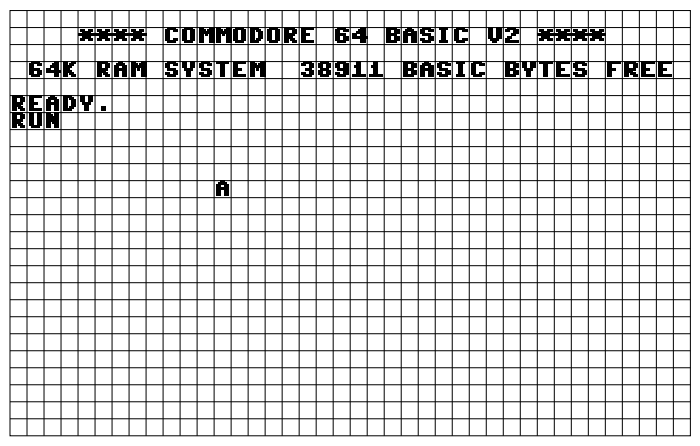
Now let’s have a look at a solution using SMC.
.const WIDTH  = 40
.const HEIGHT = 25
.const SCREEN_ADR = $0400

BasicUpstart2(main)
main:
    lda #'a'  // or lda #1
    sta char
    lda #10
    sta row
    lda #12
    sta col
    jsr draw_char

forever:
    jmp forever

draw_char:
    ldy col
    ldx row
    lda rows_lut.lo,x
    sta write_screen + 1    // Modifies the LOW byte of the address
    lda rows_lut.hi,x
    sta write_screen + 2    // Modifies the HIGH byte of the address
    lda char
write_screen:
    sta $1234,y             // SMC will update the address here
    rts

.pc = * "Data"
rows_lut: .lohifill HEIGHT, SCREEN_ADR + i * WIDTH
row:      .byte 0
col:      .byte 0
char:     .byte 0
As you can see, we are no longer using indirect addressing sta (pointer),y. We are still using absolute indexed addressing sta $1234,y.
Could you go even further and remove Y completely, using SMC to update the address with just sta $1234? Well… yes, but it’s strictly more work for no gain. Let’s now have a look at this version.
.const WIDTH  = 40
.const HEIGHT = 25
.const SCREEN_ADR = $0400

BasicUpstart2(main)
main:
    lda #'a'  // or lda #1
    sta char
    lda #10
    sta row
    lda #12
    sta col
    jsr draw_char

forever:
    jmp forever

draw_char:
    ldy col
    ldx row

    tya
    clc
    adc rows_lut.lo,x
    sta write_screen + 1    // Modifies the LOW byte of the target address
    lda rows_lut.hi,x
    adc #0
    sta write_screen + 2    // Modifies the HIGH byte of the target address
    lda char
write_screen:
    sta $1234               // SMC will update the address here
    rts

.pc = * "Data"
rows_lut: .lohifill HEIGHT, SCREEN_ADR + i * WIDTH
row:      .byte 0
col:      .byte 0
char:     .byte 0
// Recap of the Mnemonics we used so far
Round 1 & 2
| Mnemonic | Description |
|---|---|
lda | Load Accumulator — Loads a value into register A. |
ldx | Load X Register — Loads a value into register X. |
ldy | Load Y Register — Loads a value into register Y. |
sta | Store Accumulator — Writes the value from register A into memory. |
jmp | Jump — Sets the Program Counter (PC) to jump directly to a target address. |
jsr | Jump to Subroutine — Pushes the return address onto the stack and jumps to a subroutine. |
rts | Return from Subroutine — Pulls the return address from the stack and resumes execution after the jsr. |
clc | Clear Carry Flag — Clears the Carry flag (C = 0), required before 8-bit or 16-bit addition (adc). |
adc | Add with Carry — Adds a value and the Carry flag to register A (A = A + M + C). |
| bcc | Branch if Carry Clear — Jumps to a target address if the Carry flag is clear (C = 0), e.g. when an addition produced no carry out of the byte (the result stayed ≤ 255). |
bne | Branch if Not Equal — Jumps to a relative target address if the Zero flag is clear (Z = 0). |
dex | Decrement X Register — Decreases register X by 1 (X = X − 1). |
dey | Decrement Y Register — Decreases register Y by 1 (Y = Y − 1). |
inc | Increment Memory — Increases a value in memory by 1 (M = M + 1). |
asl | Arithmetic Shift Left. Shifts all bits in the accumulator or memory left by 1. Bit 7 is shifted into the Carry flag (C), and Bit 0 is filled with 0. |
lsr | Logical Shift Right. Shifts all bits in the accumulator or memory right by 1. Bit 0 is shifted into the Carry flag (C), and Bit 7 is filled with 0. |
rol | Rotate Left. Rotates all bits in the accumulator or memory left by 1 through the Carry flag. Bit 7 moves into Carry, and the old Carry value moves into Bit 0. |
ror | Rotate Right. Rotates all bits in the accumulator or memory right by 1 through the Carry flag. Bit 0 moves into Carry, and the old Carry value moves into Bit 7. |
tya | Transfer Y to Accumulator — Copies the value from register Y into register A (A = Y ). Sets the Zero flag (Z = 1) if the value is 0 and the Negative flag (N = 1) if bit 7 is set. |
inx | Increment X Register — Increases register X by 1 (X = X + 1). |
New Mnemonics introduced in Round 3
| Mnemonic | Description |
|---|---|
bit | Bit Test. Performs a bitwise AND between the memory contents and the Accumulator without altering either register. Sets the Zero flag (Z) based on the AND result, and copies memory bit 7 into the Negative flag (N) and memory bit 6 into the Overflow flag (V). |
// Next Challenge
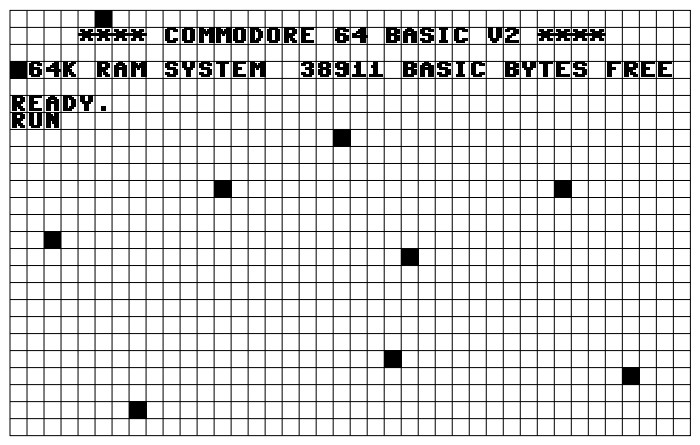
Let’s put that draw_char routine in practice and finally do something with it. The challenge this time is to write some code to fill the entire screen (40x25) char by char using random x/y positions for each char. The “filled” char to use for this is 160. Bonus: fill with the black color. In order to do so, you can use exactly the same technique we discussed so far, except that the base address to use for the colormap is $d800 instead of $0400. Both $0400 and $d800 have a length of 1000 (40x25) and could be addressed the same way. An intermediate screen should look like this.
Side note: Careful: the naïve “keep picking random positions until the screen is full” approach gets very slow near the end. Can you see why?
// Stuck?
Stuck somewhere in the challenge? Feel free to send me a PM (OCA/Atlantis) on CSDb. I’ll be happy to help when I can.
// What’s coming next
- We will discuss implementations for the fill-screen challenge.
